
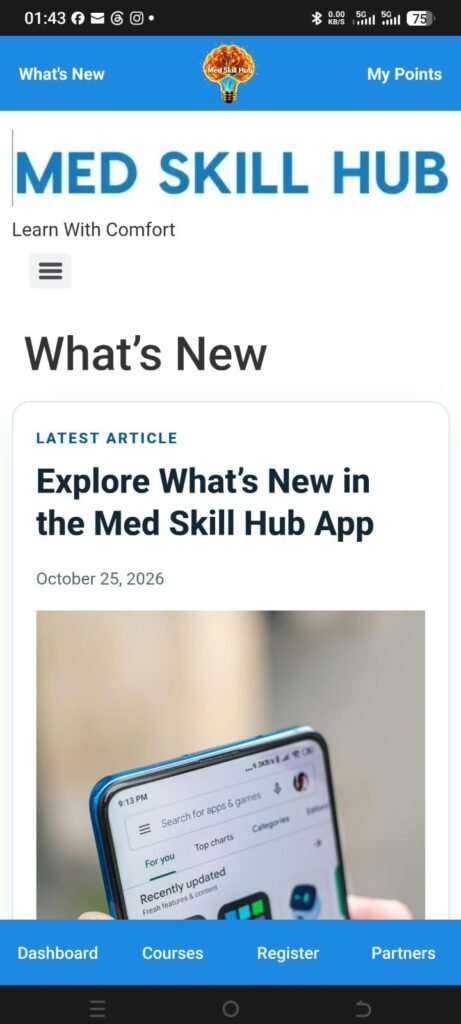
A refreshed way to learn and connect
The Med Skill Hub app has been updated to make it easier to discover professional resources, keep up with healthcare news, and continue your continuing professional development (CPD). The update introduces a new “What’s New” page and a dedicated Partners tab, while keeping your courses and learning tools close at hand.
When you open the app, you’ll now land on the What’s New page. It brings together articles, professional insights, healthcare developments, and news from the medical world. Exploring these updates can help you broaden your understanding of topics affecting healthcare professionals and support your ongoing learning alongside your CPD courses.
Share useful professional insights
At the end of each article, sharing buttons make it simple to pass relevant content along through available social media channels. Sharing useful information can prompt discussion, contribute to your professional network, and help you show your interest in developments across healthcare. Consider adding a brief personal comment about why an article stood out or how its topic relates to your work.
Discover and contact partners
The Partners tab is now available in the bottom menu. Browse the organisations featured there and learn more about their products and services. You can visit partner websites, explore their offerings, and place orders directly. Contact options, including WhatsApp where available, also let you ask questions, seek clarification, or discuss your needs with a partner.
Whether you already have a particular product or service in mind or are simply exploring, the tab offers a convenient way to find partner information and start a conversation.
Find your courses and app tools
Use the bottom menu to navigate between Dashboard, Courses, Register, and Partners. Dashboard takes you to your account and enrolled CPD courses; Courses lets you browse and purchase additional learning; and Register is for people creating an account for the first time. The top menu provides access to What’s New and My Points, where you can view your accumulated CPD points. Tap the Med Skill Hub logo to return to the home page.
To continue a course, open Dashboard, log in, and select an enrolled course. To find another course, visit Courses. Update the app through the Google Play Store to access the latest features, then explore the articles, connect with partners, and keep learning at your convenience.
